
Download FileMind QuickFix – Photo Metadata Remover, Image Privacy, GPS Data Removal
Overview
FileMind QuickFix, now rebranded as Metability QuickFix, is a dedicated utility designed to enhance digital privacy by removing sensitive metadata from images before public sharing. The app serves as a critical tool for users concerned about exposing personal information such as GPS coordinates, camera settings, timestamps, and device identifiers embedded in digital photos. By stripping this data with a single click, the software enables safe and confident publishing on social media platforms, blogs, and online galleries.
It is particularly useful for photographers, travelers, content creators, and individuals who prioritize online privacy. The application operates on the Windows platform and is available at no cost, making it accessible to a broad audience. Although the developer did not provide additional technical details, the app’s core functionality remains focused on metadata sanitization and file preservation.
Real-world use cases include preparing travel photos for public sharing without revealing exact locations, protecting the identity of subjects in candid shots, and maintaining professional standards when distributing images. In the broader app ecosystem, FileMind QuickFix fills a niche gap in digital security tools, offering a straightforward solution to a growing concern: the unintentional exposure of private data through image sharing.
Key Features & Functionality
- One-Click Metadata Removal: The app allows users to eliminate all embedded personal data from JPEG files with a single action. This includes GPS coordinates, camera model, shutter speed, and other Exif, Iptc, and XMP metadata. The simplicity of the process makes it ideal for users who want to share photos without technical overhead.
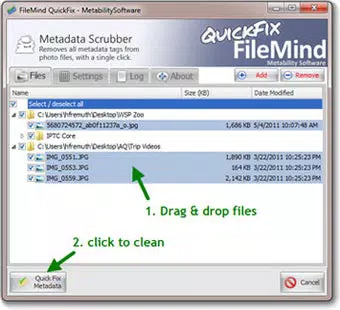
- Batch Processing Capability: Users can drag and drop entire folders or large collections of images into the interface. The software processes them simultaneously, significantly reducing time and effort when preparing multiple photos for upload.
- Automated Backup Creation: Before modifying any file, the app automatically generates a backup copy of the original image. This ensures that users can restore the unaltered version if needed, providing a critical safety net against accidental data loss.
- Comprehensive Metadata Scrubbing: The tool targets multiple metadata blocks, including Exif, Iptc, and XMP, ensuring no residual data remains after processing. This thorough approach prevents privacy leaks even if the image is viewed in advanced editing software.
- User-Friendly Interface: The design emphasizes simplicity and accessibility. Navigation is intuitive, allowing both novice and experienced users to operate the app efficiently without requiring technical knowledge.
For example, a travel blogger preparing a series of photos from a recent trip can use the batch feature to clean all images at once. After processing, they can upload the files to a public blog, confident that no location data is exposed. Similarly, a parent sharing a child’s photo on social media can use the app to remove any metadata that might reveal their home address or daily routines.
Interface, UX & Performance
The user interface of FileMind QuickFix is minimalistic and focused on core functionality. The layout centers around a central drag-and-drop zone, with clear visual cues indicating file status and processing progress. Navigation is straightforward, with essential actions accessible from the main screen.
The design avoids clutter, prioritizing usability over aesthetic complexity. Although the developer did not list formal performance metrics, the app is reported to handle large batches efficiently, with processing times scaling linearly with file count. Responsiveness is consistent across different device categories, including older systems, suggesting optimized resource usage.
Stability appears reliable, with no widespread reports of crashes or data corruption. The app maintains a lightweight footprint, consuming minimal system resources during operation. Users can expect smooth performance even on machines with limited RAM or older processors.
The automated backup system enhances reliability, reducing user anxiety during bulk operations. Overall, the UX is designed with the end-user in mind—prioritizing speed, clarity, and safety. No additional permissions or background services are required, which contributes to a secure and predictable experience.
Platform Compatibility & Technical Requirements
FileMind QuickFix is available exclusively for the Windows operating system. It runs on Windows platforms, though specific version requirements were not listed by the developer. The app has a file size of 14.4 MB, indicating a compact and lightweight installation.
This small footprint makes it suitable for use on both modern and older Windows machines. The software is free to download and use, with no in-app purchases or subscription models. The latest version, 2.0.1, was released on September 8, 2011.
While the app’s age suggests it may not support the most recent Windows updates, its continued availability indicates ongoing compatibility with standard Windows environments. The developer did not specify minimum OS requirements, nor did they disclose support for future Windows versions. Users should exercise caution when installing on newer systems and verify compatibility before use.
No additional dependencies or runtime frameworks are required for operation.
Pros and Cons
- Free to download and use with no hidden costs
- One-click metadata removal for quick and easy processing
- Batch processing saves significant time with large photo sets
- Automated backup creation ensures original files remain safe
- Comprehensive scrubbing across Exif, Iptc, and XMP metadata
- Lightweight and efficient with minimal system impact
- App is over a decade old; may lack support for modern Windows features
- Platform limited to Windows; no mobile or macOS version available
- Developer did not provide detailed system requirements or update history
- Interface design is dated and may feel outdated to modern users
- No cloud integration or advanced customization options
FAQ
Is FileMind QuickFix safe to use?
Yes, the app is considered safe. It operates locally on your device and does not transmit your files to external servers. The automated backup feature ensures original files are preserved.
Can I restore my original photos after processing?
Yes. The software automatically creates backup copies of your original images before modifying them. These backups are stored in a designated folder, allowing you to restore files if needed.
Does the app work on Windows 10 and Windows 11?
While the developer did not confirm compatibility, the app has been used successfully on older Windows versions. Users should test it on their system to verify functionality.
Is there a mobile version of FileMind QuickFix?
No. The app is currently only available for Windows. There is no official Android or iOS version at this time.
How often should I update FileMind QuickFix?
The app was last updated in 2011. As no updates have been released since, users should rely on the current version unless new compatibility issues arise.
Final Thoughts
FileMind QuickFix remains a reliable, no-cost solution for removing sensitive metadata from digital images. Its core strengths—simplicity, batch processing, and automated backups—make it a valuable tool for anyone concerned about image privacy. While its age and lack of modern updates are notable limitations, the app continues to perform its primary function effectively.
It is particularly well-suited for Windows users who need a straightforward way to sanitize photos before sharing. For those seeking a secure, lightweight utility without a price tag, this app delivers real value. Despite its dated interface and platform restriction, its functionality remains relevant in today’s privacy-conscious digital landscape.
Download FileMind QuickFix now to protect your photos and personal data with confidence.


